How to include loading, empty and error states in a UI prompt
Use a support queue example to define missing states, preserve the user’s context, and make recovery part of the interface brief.
In this article
A prompt that only describes a populated screen leaves important parts of the interface undefined. What appears before records arrive? What happens when a search finds nothing? Can someone recover from a failed request without starting over? Name those states in the brief so that the first successful screenshot is one part of the deliverable.
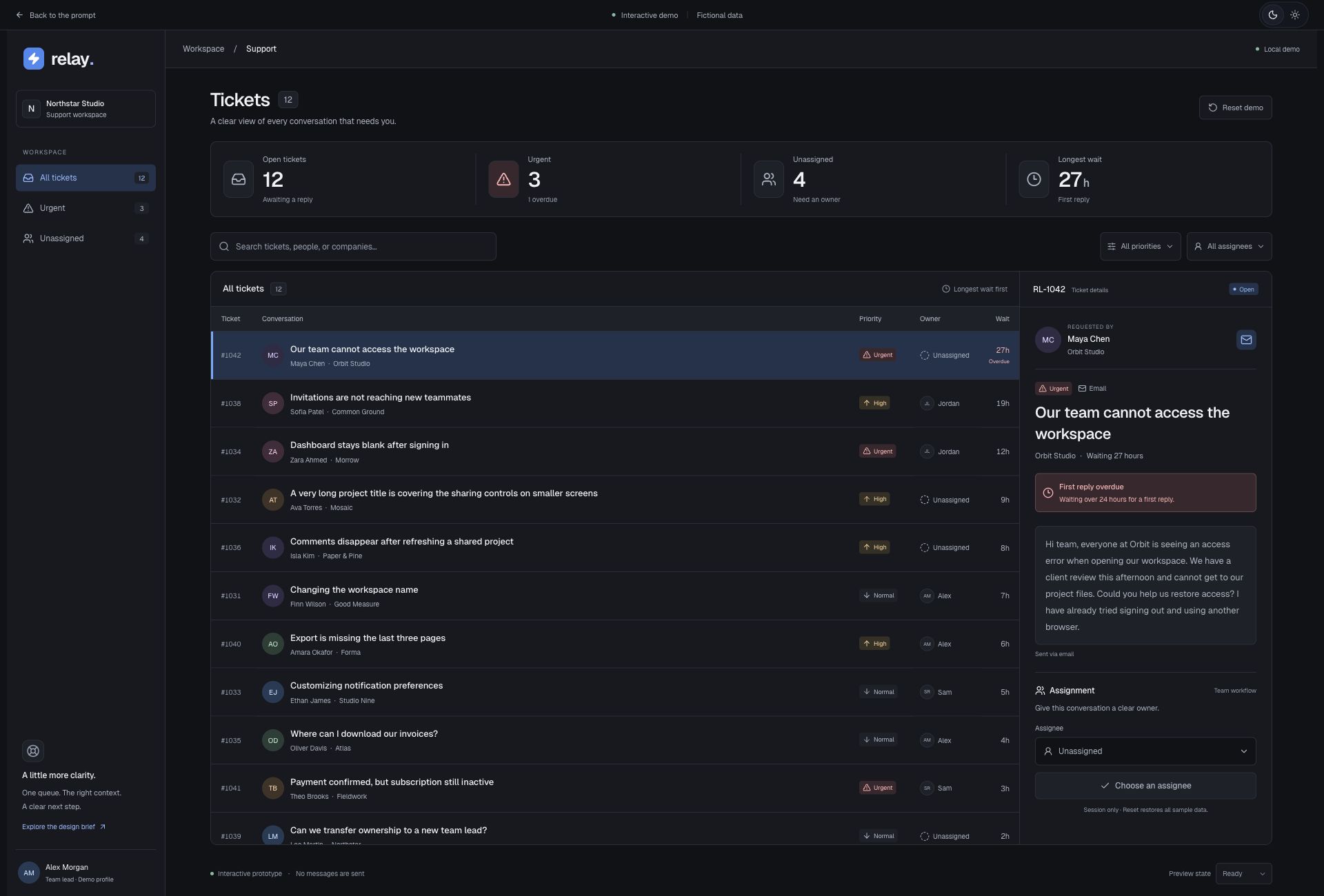
The Relay support queue gives these questions a practical setting. A support lead needs to find an urgent unanswered request and assign an owner. The prototype includes twelve fictional tickets, search and filters, a detail view and labelled controls for simulated loading and failure. It lets you inspect the states locally without sending messages or changing a real support system.
Separate an empty product from an empty result
An account with no tickets and a filtered queue with no matches need different explanations. In the first case, a real product may need an introduction to receiving requests. In the second, the useful action may be clearing search or changing a filter. The interface should explain the state it actually knows about rather than showing the same generic illustration everywhere.
For a queue brief, supply an example search that returns nothing and say how the reader can recover. Keep the search field and relevant filters available. Do not imply that all work is complete just because the current view is empty. If the prototype does not model a new account, label that as a separate state to design instead of claiming the no-results view already covers it.
Describe loading without inventing progress
State which part of the screen is waiting and which actions remain available. Loading a ticket list is different from submitting an assignment. A placeholder can preserve the shape of the content while a request is pending, but a percentage or countdown needs an actual basis. A brief can ask for a clear pending label without inventing a completion estimate.
Use the same task to review this state: can the support lead tell that the queue is loading, and what will become available next? For a local prototype, make a simulated delay visibly identifiable as a demo control. That keeps the example useful for inspecting layout while avoiding a claim about the speed or reliability of a service that is not connected.
Make recovery specific to the failed action
An error should identify the action that could not finish and provide an appropriate next step. If the list fails to load, a retry can repeat that request. If an assignment fails, preserve the selected ticket and explain that the owner has not been confirmed. These are different flows; one global error message rarely specifies enough behaviour for both.
In a real application, define the server response and the state that is authoritative after a retry. Do not show success just because someone clicked a button. Relay demonstrates local assignment and recoverable demo loading states; it does not prove remote persistence or cover every possible assignment failure. Extend the prompt explicitly when connecting a real backend, permissions or notification service.
Preserve the reader’s place through transitions
Search, filters and selected records give a person their place in the work. Say which of those should survive a retry, an edit and opening or closing details. The Relay task asks the reviewer to find RL-1042, assign it to Alex Morgan and check that the current filters remain available. That is a small sequence a reviewer can repeat after changing the layout.
Review the same sequence with a keyboard and on a narrow screen. When details open separately, provide an obvious way back to the queue. When a record disappears because an edit changes its filter membership, decide where focus should go. Add text to meaningful priority and status indicators so that colour is not the only way to understand the state.
Hand off a state list with acceptance tasks
Before building, list the initial, loading, populated, no-results and recoverable-error states. For each one, name the trigger, visible explanation, available action and data that must survive. This compact inventory helps distinguish a designed recovery path from a decorative message. Include other states only where the actual task requires them.
Open the support queue example and inspect its demo controls, then adapt the brief to your own records and services. Record what you checked and where the prototype stops. A useful state specification gives the next person a way to reproduce the situation, recognize the expected result and continue the task without guessing what happened.
Original editorial by UI Prompts, written with AI assistance from documented project work. References are credited separately. These articles do not claim measured usability improvements or consistent regeneration across tools.