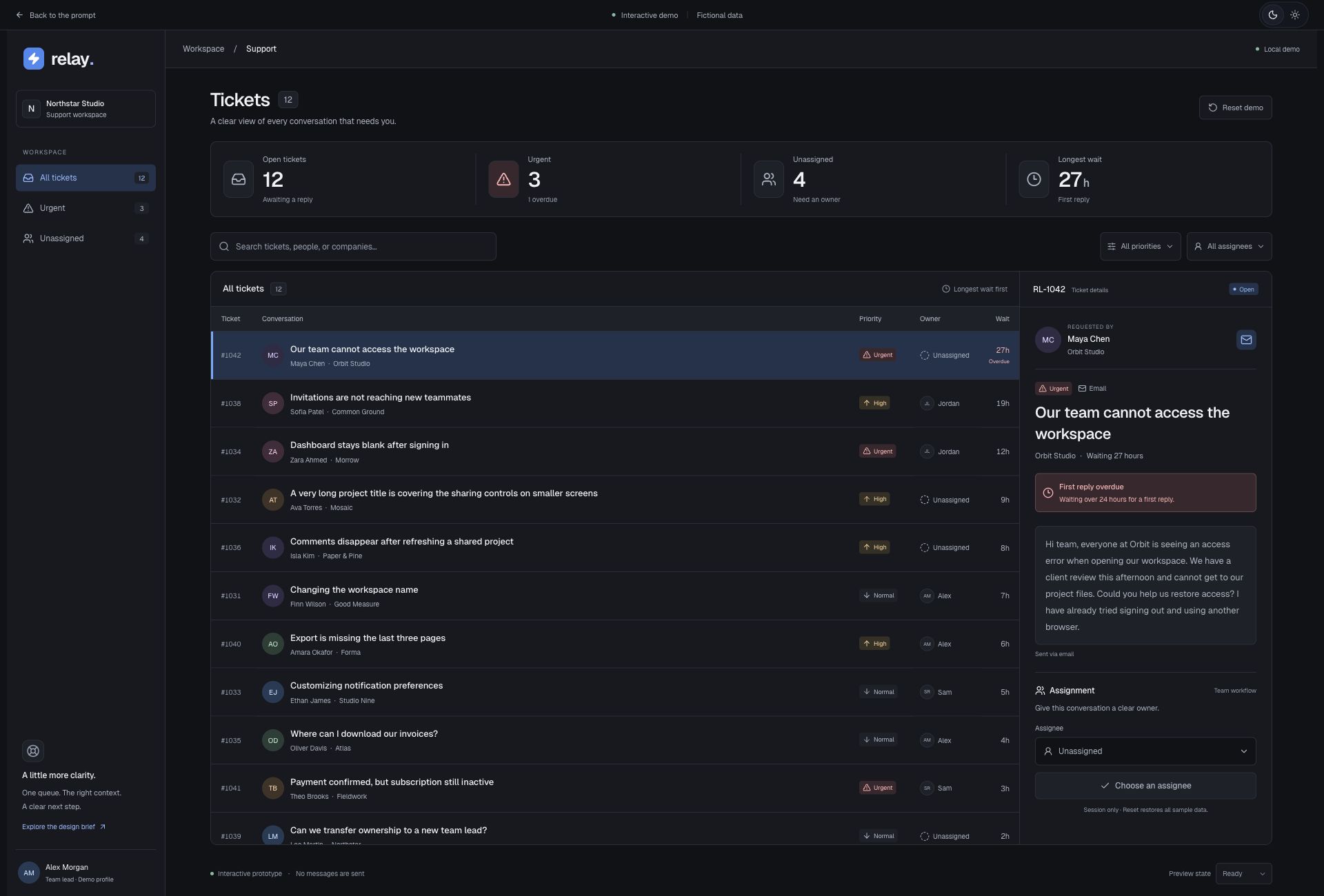
The current prompt consolidates the reviewed layout and behavior. Add the optional project setup when using this repository.
Build Relay, a polished, responsive support-queue interface for a team lead who needs to find overdue urgent requests and assign them quickly. Deliver a working code prototype using fictional local data.
LAYOUT AND VISUAL DIRECTION
Use charcoal layered surfaces, a restrained blue accent, fine borders, clear contrast, and consistent spacing. Support the host site's light/dark preference, with dark mode as the default when no preference exists. Use readable interface text, approximately 12–14px for working content, with a clear heading hierarchy and visible interaction states.
Use ONE workspace sidebar, approximately 220px wide on desktop. At its top, place the Relay icon beside its wordmark, followed by the Northstar Studio workspace selector-style identity block and a Workspace group containing All tickets, Urgent, and Unassigned views with accurate counts. These views filter the queue. Do not add a second icon rail or duplicate the logo and navigation. Keep the workspace identity block noninteractive unless workspace switching is actually implemented.
In the main area, use a compact Tickets heading and supporting sentence. Below it, show four aligned summaries: Open tickets, Urgent, Unassigned, and Longest wait. In every summary, stack the label, a prominent count of approximately 30px, and a short supporting caption VERTICALLY. Place a proportionately larger icon beside that complete stack. Captions must sit below the count, with no overlapping text. Derive all counts from the sample data.
Place search plus priority and assignee filters above a desktop list/detail workspace. Use a ticket table with columns for ticket ID, conversation, priority, owner, and waiting time. Conversation cells contain initials avatars, issue subjects, and quieter customer/company text. Keep rows aligned, highlight the selected row subtly, and truncate long subjects without obscuring the full accessible name. Sort longest waits first.
Use a distinct detail panel, approximately 325–365px wide on larger screens. Include the ticket ID and open status, requester identity and company, channel, priority, subject, waiting time, original customer message, and assignment controls. Give urgent requests waiting over 24 hours a clear overdue notice. Provide a labeled assignee selector and an explicit update action. Do not introduce AI summaries, confidence scores, or controls without working behavior.
DATA AND BEHAVIOR
Supply twelve fictional tickets with varied subject lengths, customer names, companies, priorities, owners, waiting times, and Email/Chat channels. Start with three Urgent tickets and four Unassigned tickets. Include RL-1042 from Maya Chen at Orbit Studio, titled “Our team cannot access the workspace,” marked Urgent, Unassigned, and waiting 27 hours. Select it initially on desktop. Offer Alex Morgan, Sam Rivera, and Jordan Lee as assignees, plus Unassigned.
Search must match ticket IDs, subjects, customer names, and companies. Combine search, priority, assignee, and queue-view filters. Assignment must update the ticket, list, and relevant counts while retaining active filters. If a ticket stops matching a filter after assignment, remove it from that filtered view and show a confirmation naming its new owner. Show a helpful empty state with a clear-filters action. Provide separately labeled demo controls for loading and a recoverable load error, plus a reset that restores fixtures and filters. Store changes in local session state only; no authentication, external services, or messages sent.
RESPONSIVE AND ACCESSIBLE BEHAVIOR
On phones, hide the desktop sidebar and provide visible queue-view buttons. Use a two-column summary grid with the same label/count/caption stacks and icons. Turn table rows into readable conversation cards, preserve search and filters, and open ticket details as a separate view with an obvious Back to inbox action. Opening a ticket should bring its detail view into view and transfer focus appropriately; Back should restore focus to its ticket. Avoid horizontal page overflow. Give controls accessible names and visible keyboard focus. Communicate priority and overdue status with text as well as color, and respect reduced-motion preferences.
ACCEPTANCE
A reviewer can filter to Urgent, find RL-1042, assign it to Alex Morgan, and see the updated owner without losing the Urgent filter; the unassigned count changes from four to three. Search, combined filters, selection, reset, no-results, loading, and retry must work. The phone layout must preserve the same assignment task. Report assumptions or limitations rather than claiming usability or accessibility compliance without testing.
Scroll to read. Copy includes the full prompt.