From a visual reference to a working interface
What the Relay support queue taught us about interpreting references, defining behaviour, and reviewing the gap between a screenshot and a working flow.
In this article
A visual reference can communicate a lot quickly: density, hierarchy, spacing, and the relationship between navigation and content. It still leaves a team to decide what the interface should do. The Relay support queue became useful when we connected its visual direction to a specific support task.
The brief was adapted from a support-dashboard example discussed by Esteban Suárez in Vercel’s prompting guide. The visual direction was later informed by the Aivia Ticket Page by Ryan Indra for Semusim Team. Relay’s fictional brand, ticket data, and implementation are our adaptation; those references are credited separately.
Set a concrete task before arranging the screen
A support lead needs to find an unanswered urgent request and assign it quickly. That task calls for waiting time, priority, ownership, search, and enough customer context to make an assignment. A general request for a “professional dashboard” would leave those requirements unresolved.
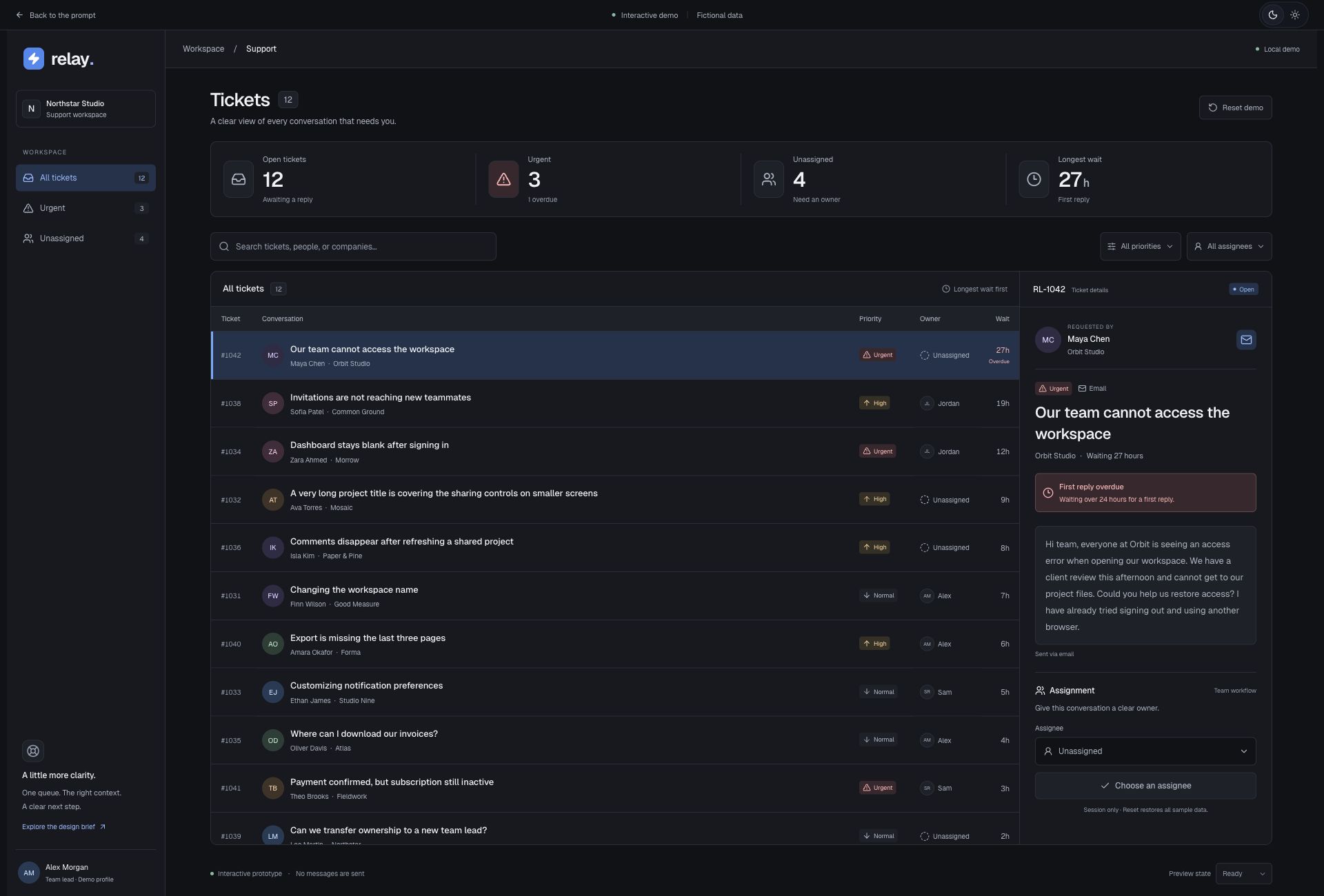
We supplied twelve fictional tickets, including an urgent unassigned request waiting over a day. Different subject lengths and ownership states gave the table realistic variation. The data then provided a way to review the interface instead of treating every row as decoration.
Interpret the reference’s structure
One early issue was duplicated navigation: an icon rail carried ticket filters while another column repeated workspace identity and navigation. The reference’s collapsed rail had been interpreted as another set of queue controls. Looking at the role of each region helped resolve the duplication.
The resulting Relay layout uses a single workspace sidebar with All tickets, Urgent, and Unassigned queues. On desktop, the main content pairs the ticket list with a separate detail panel. Summary cards use a readable order of label, value, and supporting text. These are adaptations to Relay’s task, rather than a requirement to reproduce every visual element of Aivia.
Make the behaviour part of the deliverable
- Search and filters should affect actual ticket records.
- Opening a ticket should reveal the matching customer context.
- Assigning an owner should update that ticket while preserving the active filter.
- Priority should have text labels as well as colour.
- A narrow phone should open details separately and provide an obvious way back.
In the working example, you can find RL-1042, the urgent ticket waiting 27 hours, and assign it to Alex Morgan. The filters remain available as the owner updates. Those are observable behaviours a reviewer can check; a screenshot cannot establish that they work.
Include states that interrupt the happy path
The prototype includes controls for loading, no search matches, and a recoverable load error. These are explicitly labelled demo states. They help expose the layout and recovery decisions without suggesting that the app is connected to a live support service.
Keyboard opening, focus return, and list-to-detail navigation on a narrow screen also deserve attention. A layout that reads well on a large monitor may require a different sequence on a phone. Preserve the task and the user’s place as the arrangement changes.
Keep the evidence and the limits clear
The detail page records the brief, source credit, implementation context, and checks performed. Those checks concern this implementation. They do not establish that another tool will regenerate the same interface or that users will complete support work faster.
Relay has no connected support backend. Its ticket changes reset on refresh. Use the example to inspect a complete local flow, then adapt the prompt around your own service, permissions, records, and operational requirements. A visual reference is most useful when its decisions can be explained in the context of the work.
References and credit
Original editorial by UI Prompts, written with AI assistance from documented project work. References are credited separately. These articles do not claim measured usability improvements or consistent regeneration across tools.