Real context.
Useful constraints.
A complete brief for this working fictional example.
TASK AND PERSON
A small agency needs to understand a client-management tool and see what the product actually does.
DESIGN AND CONTENT
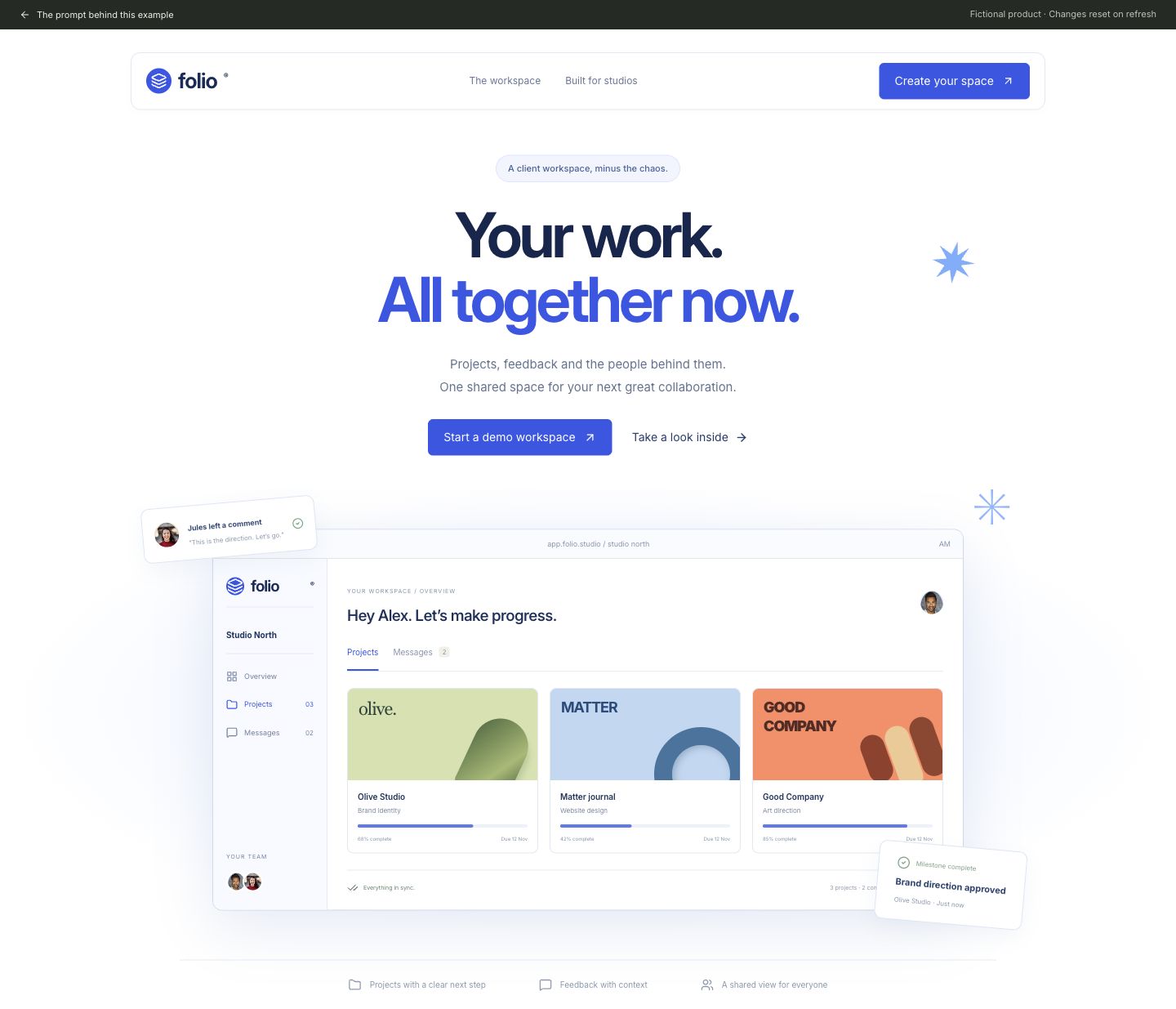
Create the hero and live product preview for a fictional client hub called Folio. Use a true-white canvas, electric blue #3457e8 and navy #15264e. Study the credited Lumen reference for its centered composition: a floating white navigation bar, oversized heavy sans-serif headline ‘Your work. All together now.’ with blue emphasis, specific supporting copy and one primary action. Below, show a miniature client workspace with a compact sidebar, three deliberately art-directed project cover tiles (olive green, powder blue and coral), progress values and a Messages tab. Use the small comment and approval cards to explain the product. Use the bundled Joseph Gonzalez and Michael Dam portraits for member avatars, not initials. Credit both photographers in accompanying notes. Draw an asymmetric blue starburst, not generic decorative gradients. No testimonials, fake customers or performance claims.
BEHAVIOR AND STATES
The primary action opens a local workspace setup dialog. Require a workspace name, then show the name in the preview. Product tabs switch between Projects and Messages using local fictional content. Clicking Take a look inside moves focus to the product preview.
DELIVERY
Deliver a working responsive web interface, not a static image. Use local fictional data and in-memory state. No authentication, analytics, remote data requests, payments or persistent storage. Serve any bundled fonts and images locally. Include an obvious return-to-prompt link and clearly identify this as a demonstration. Keep every visible navigation item or action useful; do not add decorative fake controls.
ACCESSIBILITY AND RESPONSIVENESS
Use semantic headings, labelled inputs and real buttons. Touch controls must be at least 44 px high. Provide visible keyboard focus and announce updates with a status region. Do not rely only on color. Dialogs need a visible title, Escape dismissal, focus containment and focus restoration. At 390 px, preserve the reading order and all actions without horizontal page overflow. Respect reduced motion.
ACCEPTANCE
On desktop and a 390 px phone, complete the primary task described above, exercise an invalid or empty state, recover without losing unrelated inputs, and restore its initial state using the reset control where provided, or by refreshing. Verify displayed calculations and selected states against the fictional data. Report exactly what was checked; do not claim usability improvements or reliable independent regeneration.
ASSETS AND OPTIONAL VISUAL REFERENCES
Bundled assets: /images/patterns/assets/portrait-joseph-gonzalez.avif, /images/patterns/assets/portrait-michael-dam.avif. If building outside this repository, supply those files with the prompt or use suitable licensed replacements. Draw the described product artwork in code. The written requirements define the scope; reference links are optional visual context.
Can Aydın: https://dribbble.com/shots/25162355--Lumen-A-Clean-and-Modern-SMM-Panel-Landing-Page
Joseph Gonzalez / Unsplash: https://unsplash.com/photos/man-wearing-white-v-neck-shirt-iFgRcqHznqg
Michael Dam / Unsplash: https://unsplash.com/photos/closeup-photography-of-woman-smiling-mEZ3PoFGs_k
Scroll to read. Copy includes the full prompt.Inputs, credit and review